Vizard Review 2026: Excellent AI Video Generator and Editing Tool among Creators
Last Updated: June 2, 2026
Tested, Reviewed & Written by SaaS & Software Reviews Editorial Team
Video content is taking control of the digital world and creators are seeking tools to help them edit their videos faster and easier. It is the easiest video editing software to use by podcasters, marketers, educators, and small business owners, who want professional-quality videos without having to learn complex software. Is this the right tool as a video editor? In this review, I will take you through its features, pricing, use cases, upsides and downsides, and alternatives as well as the ethical considerations to help you decide.
What is a Vizard?
It is an AI-based video editor that is easy to use by all. It transforms unedited video into a compelling video format to be used on YouTube, Tik Tok, or Instagram with minimal effort. This AI tool also automates processes such as cutting, adding captions, and repurposing content, unlike complex editing software, and delivers polished results quickly. It is ideal for creators who wish to have high quality videos without the difficulty.
Technology of Vizard
The platform has a variety of AI models that are relevant to various needs:
Features
The software is loaded with features that make video editing easy and time-saving. The main features of this tool are the following:
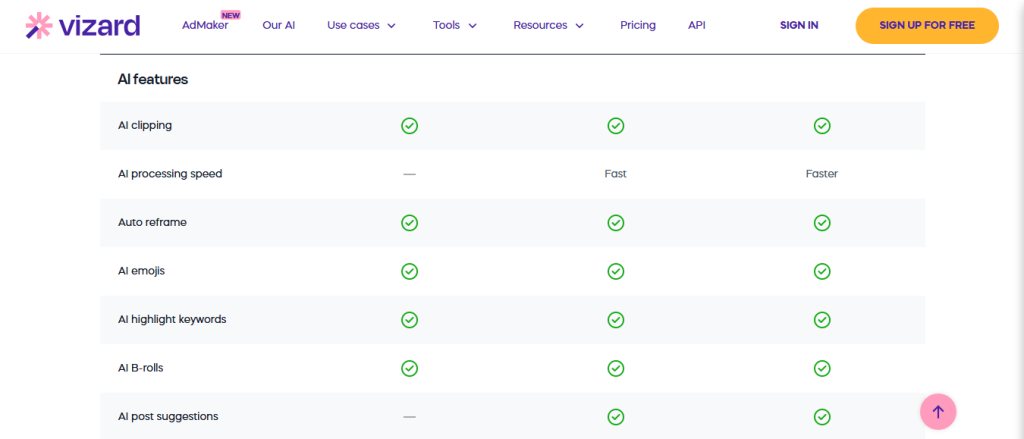
AI-Powered Video Editing
Its main strength as a tool is that it is capable of automatically editing videos. Upload your videos and the AI finds where the best moments are, eliminates any filler words, and gives you a high-quality version of your video. You can edit the results to your style, and it fits best in social media or professional applications.
Automatic Subtitles and Captions
The platform produces precise subtitles in a few seconds, and it has supported more than 50 languages. You can customize fonts, colors, and styles to your brand. The feature enhances accessibility and interaction among viewers who watch them without sound.
Multilingual Support
The application allows you to convert videos to various languages without changing the tone or the context. This is fantastic when targeting global consumers or companies that need to extend their market.
Video Repurposing
Convert one video into many formats such as a long YouTube video into short Tik Tok videos or Instagram Reels This AI program recommends the ideal segments of every platform, saving you time.
This feature makes Vizard a powerful option for creators who want fast and simple video production. Similarly, tools like BasedLabs, and Fliki AI also allow users to transform images into stunning videos effortlessly, making it another strong alternative for content creators.
Text-to-Video Tool
One can directly feed something in text and this tool will generate a video using stock footage, animations, or computer-generated graphics. It is ideal to make quick explainers or promotional material.
Real-Time Editing
Real-time adjustment of cuts, transitions, or captions with this AI tool simple user interface. Preview changes in real time to make sure your video just looks right.
API Integration
Developers can easily integrate this software tools into their apps or workflows, thus making it possible to automate video creation process when working on large volumes.
Additional Tools
Versatile Applications
This video editor covers a broad set of applications:
This video editor is versatile as it has features that make it applicable to everyone who wants to create professional looking videos within record time.
How to Use
This software is easy to start with. To create your first video follow these steps:
Step 1: Sign Up
Go to the Vizard site and click on Sign Up.
Sign up with your email or social media.
Select a plan-start with the free one to check the fundamentals.
Step 2: Explore the Dashboard
Check your usage and features available.
Explore features such as the clip generator, subtitle editor, and the repurposing tools.
Step 3: Create Your First Video
Leave your raw files, or type, to have AI create an image.
Choose a template or allow this tool AI to make recommendations
Edit subtitles, transitions, or logo.
Edit the video and make adjustments to your own vision.
Step 4: Customize Your Content
Make short snippets by using the AI clip generator.
Edit audio, insert music, or caption accessibility.
Translations might be required, translate your video to reach international audiences.
Step 5: Export and Share
Download your video in the version you prefer (MP4, MOV, etc.).
You can share it with direct social links or drop it into your Web page.
Step 6: Play with Advanced Features
Repurpose a video across platforms.
Use the API to automate workflows as a developer.
Browse the library of stock material to get additional images or music.
Step 7: Stay Updated
To receive the news and tips, read this platform blog.
To discuss and get ideas to learn more about different users, join online communities.
Pricing Plans
This tool can be offered at flexible prices to cater to the needs of individuals to large team setups:
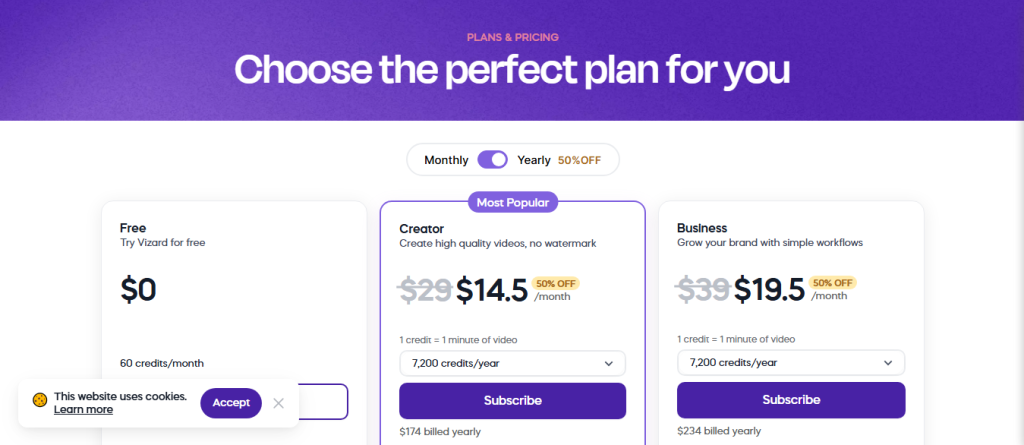
| Plan | Monthly Cost | Yearly Cost (Billed Annually) | Credits/Usage | Key Features | Best For |
| Free | $0 / month | $0 | 60 credits / month | AI-generated clips, 720p export, editor access, 3-day storage, 1 social account | Beginners exploring Vizard |
| Creator | $29 / month | $290 / year(50% OFF → $145 first year) | 1 credit = 1 min video7,200 credits / year | No watermark, 4K exports, scheduling, unlimited storage, manage 6 social accounts | Individual creators & influencers |
| Business | $39 / month(50% OFF → $19.5 first month) | $390 / year(50% OFF → $195 first year) | 1 credit = 1 min video7,200 credits / year | Everything in Creator + shared workspace, add team members (+$5/seat), brand kit, custom fonts, manage 20 social account |
The prices are affordable, and the free plan will help you test the main features of this AI tool. Paid subscriptions allow users to access increased export amounts and further features.
Pros and Cons
Best Use Cases
This video editing program excels in situations that require high-velocity and ease:
Advantages
Saves Time
This software will provide assistance in automatic repetition of the task of cutting and captioning so you can concentrate on creativity.
Cost-Effective
It also helps it avoid the costly professional editing programs or an editor, as it makes the task very affordable.
Engages Audiences
It can also be used with captions and translations so that it can appeal to a wide audience and increase interactions.
Creative Flexibility
Test your style and format and platform easily without technical obstructions.
Accessibility Focus
Automatic captions allow content to be accessible to individuals with auditory challenges.
Competitive Edge
Its quick turnaround and professional output will make you stand out in the crowded markets.
Alternatives
In case this software does not satisfy all of your expectations, you can also take a look at the following alternatives:
Ethical and Legal Considerations
Using video editing software, such as Vizard, brings up several ethical considerations:
Adherence to these practices will make your work ethical and enable the audience to trust it.
Final Thoughts: Is Worth It?
This AI tool can be a breakthrough that a user who wants to make a professional video does not have to spend time on an editing process. With its accessibility, lower prices, and AI-based tools, it is also a robust solution to creators, educators, and businesses. It will work with you to create social media clips, e-learning, or marketing videos at a high quality in a short time.
The free plan is a good introduction to casual users. Creators or businesses that wish to take their content seriously will find the paid plans worth the expense due to their increased features and freedom. If you need to streamline your video workflow, and reach the global audience, it is definitely worth a try.