
MioCreate vs Remaker AI: Which Face Swap Tool Is Better in 2026?
Last Updated: June 14, 2026
Tested, Reviewed & Written by SaaS & Software Reviews Editorial Team
MioCreate and Remaker AI are two popular face swap tools, but they serve different needs. MioCreate focuses on simplicity and video face swaps, while Remaker AI offers more image editing and photo enhancement tools.
After comparing features, pricing, ease of use, and output quality, both platforms perform well, but the better choice depends on how you plan to use them.
MioCreate vs Remaker AI: Quick Verdict
Overall Winner
MioCreate is the better overall choice for most users. It combines photo face swaps, video face swaps, and content creation tools in a simple, beginner-friendly platform.
Best for Beginners
MioCreate offers a smoother learning experience. Its clean interface and straightforward workflow make it easier for first-time users to get started.
Best for Face Swap Quality
Remaker AI has a slight advantage when working with detailed image edits and photo-based face swaps. Results can appear more refined in certain scenarios.
Best for Video Face Swaps
MioCreate performs better for users focused on video face replacement. The platform offers a more streamlined workflow for creating short-form video content.
Best Free Plan
Remaker AI is the stronger option for users who want to experiment without spending money. Its free tools are among the most generous in this category.
Best Value for Money
MioCreate delivers better overall value by combining multiple content creation features, face swap tools, and affordable paid plans in a single platform.
MioCreate vs Remaker AI at a Glance
If you’re choosing between MioCreate and Remaker AI, the biggest difference comes down to focus. MioCreate is geared toward face swaps and content creation, while Remaker AI offers a wider range of image editing and enhancement tools.
Side-by-Side Comparison Table
| Feature | MioCreate | Remaker AI |
| Photo Face Swap | ✅ | ✅ |
| Video Face Swap | ✅ | ✅ |
| Multiple Face Swap | ✅ | ✅ |
| AI Headshots | ❌ | ✅ |
| Background Removal | Limited | ✅ |
| Object Removal | ❌ | ✅ |
| Ease of Use | 9/10 | 8.5/10 |
| Free Plan | Good | Better |
| Best For | Content Creators | Image Editing |
| Overall Rating | 8.6/10 | 8.5/10 |
| Feature | MioCreate | Remaker AI |
|---|---|---|
| Photo Face Swap | ✅ | ✅ |
| Video Face Swap | ✅ | ✅ |
| Multiple Face Swap | ✅ | ✅ |
| AI Headshots | ❌ | ✅ |
| Background Removal | Limited | ✅ |
| Object Removal | ❌ | ✅ |
| Ease of Use | 9/10 | 8.5/10 |
| Free Plan | Good | Better |
| Best For | Content Creators | Image Editing |
| Overall Rating | 8.6/10 | 8.5/10 |
Overall Ratings Comparison
| Category | MioCreate | Remaker AI |
|---|---|---|
| Ease of Use | 9/10 | 8.5/10 |
| Features | 8.5/10 | 9/10 |
| Face Swap Quality | 8.5/10 | 9/10 |
| Video Face Swaps | 8.5/10 | 8/10 |
| Pricing | 9/10 | 8.5/10 |
| Value for Money | 8.5/10 | 8.5/10 |
| Overall Rating | 8.6/10 | 8.5/10 |
Key Differences in One Minute
What Is MioCreate?
MioCreate is a browser-based platform that helps users create face swaps, video face replacements, and other visual content without advanced editing skills. It is designed for content creators, social media users, marketers, and anyone looking for a fast way to create engaging visuals.
Core Features
MioCreate includes several content creation tools, including:
Strengths
Limitations
What Is Remaker AI?
Remaker AI is an online image editing platform that offers face swapping, photo enhancement, headshot generation, background removal, and several other image-focused tools. It is designed for users who want more than basic face swaps and need additional photo editing capabilities in one place.
Core Features
Remaker AI includes a wide range of image editing tools, including:
Strengths
Limitations
Our Hands-On Testing Methodology
To compare MioCreate and Remaker AI fairly, we evaluated their most important features, including face swap quality, video performance, ease of use, pricing, and overall user experience. The goal was to identify which platform delivers the best results for different types of users.
How We Evaluated Both Tools
Both platforms were assessed across real-world content creation tasks. We focused on face swap accuracy, output quality, processing speed, feature availability, and value for money.
Testing Environment
The evaluation was conducted using desktop and mobile browsers. We reviewed each platform’s workflow, responsiveness, and overall usability across different devices.
Images and Videos Used
We used portrait photos, selfies, group photos, and short video clips to evaluate performance in common content creation scenarios. This helped assess how each platform handled different image qualities, face angles, and editing situations.
Evaluation Criteria
- Face Swap Quality
- Video Face Swap Performance
- Ease of Use
- Features
- Processing Speed
- Pricing
- Accuracy
- Value for Money
- Overall User Experience
Feature Comparison
Both MioCreate and Remaker AI offer face swap tools, but their overall feature sets differ. MioCreate focuses on content creation and ease of use, while Remaker AI provides a broader range of image editing tools.
| Feature | MioCreate | Remaker AI |
|---|---|---|
| Photo Face Swap | ✅ | ✅ |
| Video Face Swap | ✅ | ✅ |
| Multiple Face Swap | ✅ | ✅ |
| AI Headshot Generator | ❌ | ✅ |
| Background Removal | Limited | ✅ |
| Object Removal | ❌ | ✅ |
| AI Image Editing | Basic | Advanced |
| Creative Templates | ✅ | Limited |
| Additional AI Tools | ✅ | ✅ |
Photo Face Swap
Both platforms produce strong face swap results. Remaker AI has a slight edge for image-focused editing, while MioCreate offers a simpler workflow.
Video Face Swap
MioCreate performs better for users who frequently create short-form video content. The process feels more streamlined and beginner-friendly.
Multiple Face Swap
Both tools support multiple face replacements in group photos and videos. Performance is generally reliable on clear, well-lit images.
AI Headshot Generation
Remaker AI includes dedicated headshot generation tools, making it the better option for professional profile photos and business portraits.
Background Removal
Remaker AI offers more advanced background editing capabilities, giving users greater control over image customization.
Object Removal
Remaker AI includes object removal tools that allow users to erase unwanted elements from photos, a feature not available in MioCreate.
AI Image Editing
For image enhancement, restoration, and photo editing tasks, Remaker AI provides a wider range of tools and editing options.
Creative Templates
MioCreate offers more content-focused templates and creative features designed for social media posts and visual content creation.
Additional AI Tools
Both platforms include extra tools beyond face swapping, but Remaker AI leans toward image editing, while MioCreate focuses more on content creation and media generation.
Face Swap Quality Comparison
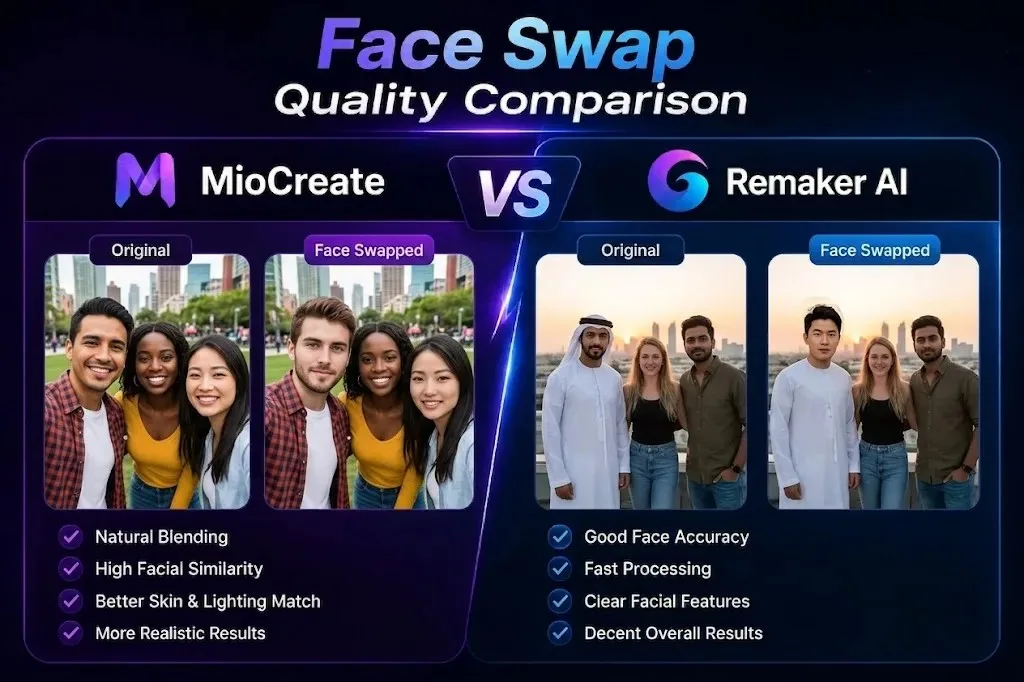
Face swap quality is where the biggest differences between MioCreate and Remaker AI become noticeable. Both tools produce solid results, but they excel in slightly different areas depending on the image type and editing requirements.
Portrait Face Swap Results
Both platforms performed well with portraits and selfies. Remaker AI delivered slightly sharper facial details, while MioCreate produced natural-looking results with less effort.
Group Photo Results
For group photos, both tools detected multiple faces accurately. MioCreate handled group swaps smoothly, while Remaker AI offered more flexibility when working with complex images.
Celebrity Face Swap Results
Both platforms generated convincing celebrity-style face swaps. Remaker AI often preserved finer facial details, while MioCreate focused on creating balanced and natural-looking outputs.
Difficult Image Results
When tested with side profiles, low-resolution photos, or challenging lighting conditions, results varied on both platforms. Remaker AI generally showed stronger image reconstruction, though neither tool was perfect in difficult scenarios.
Realism and Natural Appearance
For overall realism, Remaker AI holds a slight advantage. Facial blending, skin tone matching, and edge transitions often appeared more refined in image-based face swaps.
Facial Accuracy and Detail Preservation
Remaker AI preserved facial details more consistently, especially around eyes, hairlines, and facial contours. MioCreate remained highly competitive and delivered accurate results for most everyday content creation needs.
| Category | Winner |
| Portrait Face Swaps | Remaker AI |
| Group Photos | Tie |
| Celebrity Face Swaps | Remaker AI |
| Difficult Images | Remaker AI |
| Natural Appearance | Remaker AI |
| Ease of Getting Good Results | MioCreate |
| Overall Face Swap Quality | Remaker AI |
Video Face Swap Comparison
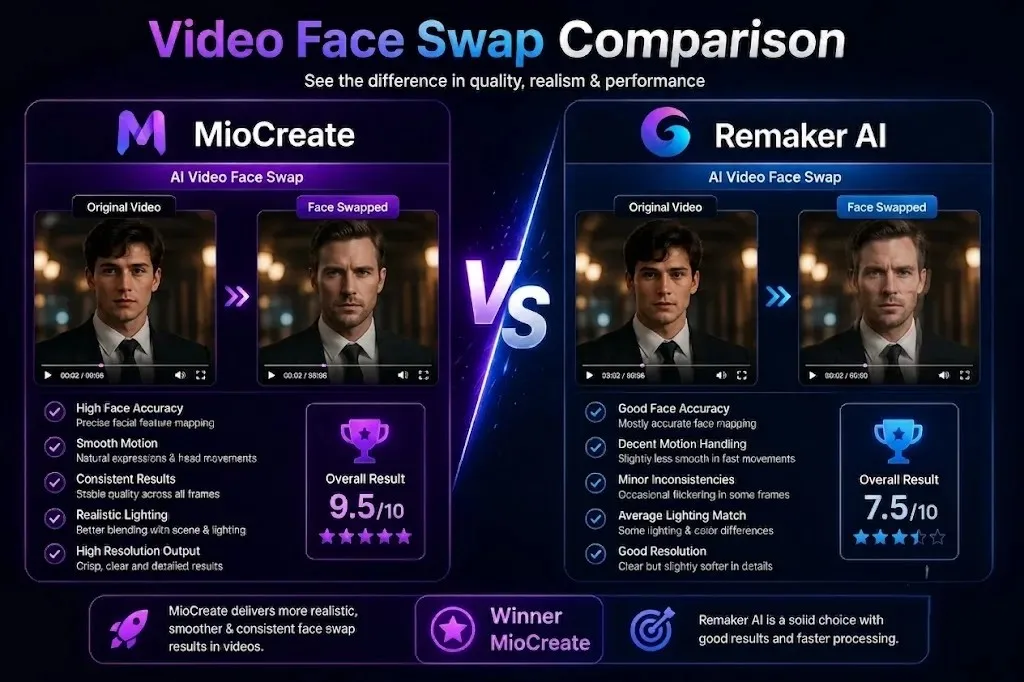
While both platforms support video face swaps, their performance differs when it comes to workflow, speed, and consistency. MioCreate is more focused on video-based content, giving it an advantage for creators who regularly work with short clips.
Portrait Face Swap Results
Both platforms performed well with portraits and selfies. Remaker AI delivered slightly sharper facial details, while MioCreate produced natural-looking results with less effort.
Group Photo Results
For group photos, both tools detected multiple faces accurately. MioCreate handled group swaps smoothly, while Remaker AI offered more flexibility when working with complex images.
Celebrity Face Swap Results
Both platforms generated convincing celebrity-style face swaps. Remaker AI often preserved finer facial details, while MioCreate focused on creating balanced and natural-looking outputs.
Difficult Image Results
When tested with side profiles, low-resolution photos, or challenging lighting conditions, results varied on both platforms. Remaker AI generally showed stronger image reconstruction, though neither tool was perfect in difficult scenarios.
Realism and Natural Appearance
For overall realism, Remaker AI holds a slight advantage. Facial blending, skin tone matching, and edge transitions often appeared more refined in image-based face swaps.
Facial Accuracy and Detail Preservation
Remaker AI preserved facial details more consistently, especially around eyes, hairlines, and facial contours. MioCreate remained highly competitive and delivered accurate results for most everyday content creation needs.
| Category | Winner |
| Video Output Quality | Tie |
| Face Tracking Accuracy | MioCreate |
| Motion Consistency | MioCreate |
| Rendering Speed | MioCreate |
| Ease of Use | MioCreate |
| Overall Video Face Swaps | MioCreate |
Ease of Use Comparison
Ease of use is one of the biggest factors when choosing a face swap tool. Both platforms are beginner-friendly, but MioCreate offers a simpler experience with fewer steps and a cleaner workflow.
First-Time User Experience
Getting started is easy on both platforms. However, MioCreate makes it faster for new users to create their first face swap without exploring multiple tools and settings.
User Interface Design
MioCreate features a cleaner and more streamlined interface. Remaker AI offers more tools, but the larger feature set can feel slightly overwhelming for first-time users.
Navigation and Workflow
MioCreate keeps the process simple: upload, swap, and download. Remaker AI provides more editing options, which adds flexibility but also increases the number of steps required.
Learning Curve
Most users can become comfortable with MioCreate within minutes. Remaker AI remains easy to learn but requires more time to explore its additional image editing features.
Best Option for Beginners
For beginners, MioCreate is the clear winner. Its simple interface, faster workflow, and lower learning curve make it easier to start creating face swaps right away.
| Category | Winner |
| First-Time User Experience | MioCreate |
| User Interface Design | MioCreate |
| Navigation and Workflow | MioCreate |
| Learning Curve | MioCreate |
| Beginner Friendliness | MioCreate |
| Overall Ease of Use | MioCreate |
Performance Comparison
Performance affects more than just speed. A good face swap tool should deliver consistent results across different image types, devices, and editing scenarios. Both platforms perform well, but each has its own strengths.
Processing Speed
MioCreate generally completed face swaps and video processing faster, especially for short-form content. Its streamlined workflow helps users generate results with minimal waiting time.
Output Consistency
Both tools produced reliable results on clear images. Remaker AI was slightly more consistent when handling complex edits, while MioCreate performed well across everyday content creation tasks.
Accuracy Across Different Image Types
Remaker AI showed a small advantage when working with difficult images, including side profiles, lower-quality photos, and challenging lighting conditions. MioCreate delivered strong results on portraits, selfies, and standard social media images.
Mobile Performance
MioCreate offered a smoother mobile experience with faster navigation and a simpler workflow. It felt better optimized for users creating content directly from mobile devices.
Desktop Performance
Both platforms performed well on desktop browsers. Remaker AI benefits from the larger workspace when using multiple editing tools, while MioCreate provides a cleaner and faster overall experience.
| Category | Winner |
| Processing Speed | MioCreate |
| Output Consistency | Remaker AI |
| Accuracy Across Image Types | Remaker AI |
| Mobile Performance | MioCreate |
| Desktop Performance | Tie |
| Overall Performance | Tie |
Pricing Comparison
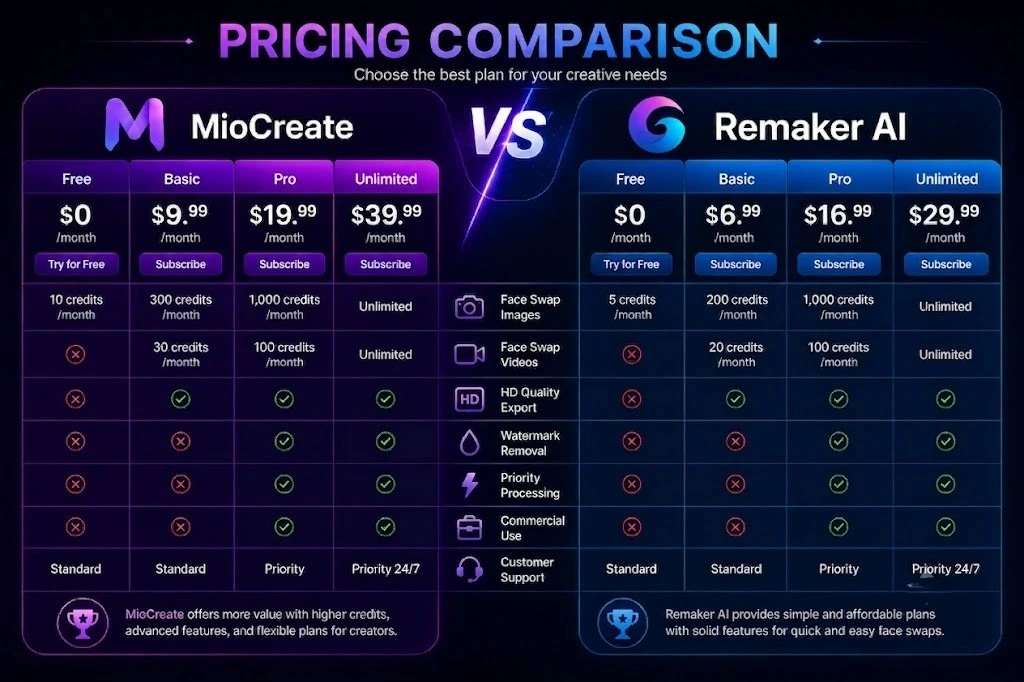
Pricing can have a major impact on long-term value, especially for creators who generate face swaps regularly. Both platforms use a credit-based model, but they differ in how those credits are allocated and consumed.
MioCreate Pricing
MioCreate offers a free plan along with monthly, half-yearly, and annual subscriptions. The platform focuses on affordable pricing and lower costs for users who create content frequently.
Remaker AI Pricing
Remaker AI also provides free usage and paid credit packages. Pricing varies depending on the tools used, with some advanced image editing features consuming more credits than basic face swaps.
Credit System Comparison
Both platforms rely on credits rather than unlimited generations. MioCreate keeps its system relatively simple, while Remaker AI’s credit usage can vary across different tools and editing features.
| Pricing Factor | MioCreate | Remaker AI |
| Free Plan | ✅ | ✅ |
| Paid Plans | ✅ | ✅ |
| Credit-Based System | ✅ | ✅ |
| Simple Pricing Structure | ✅ | ❌ |
| Broad Tool Access | ✅ | ✅ |
Cost Per Generation
For regular face swap users, MioCreate generally offers a lower cost per generation. Remaker AI can become more expensive when using multiple premium image editing features on a frequent basis.
Best Value for Money
For users focused mainly on face swaps and content creation, MioCreate offers better overall value. For users who also need image enhancement, object removal, and additional editing tools, Remaker AI can justify its higher credit usage.
| Category | Winner |
| Pricing Simplicity | MioCreate |
| Cost Per Generation | MioCreate |
| Free Usage | Remaker AI |
| Feature-to-Price Ratio | Remaker AI |
| Overall Value for Money | MioCreate |
Free Plan Comparison
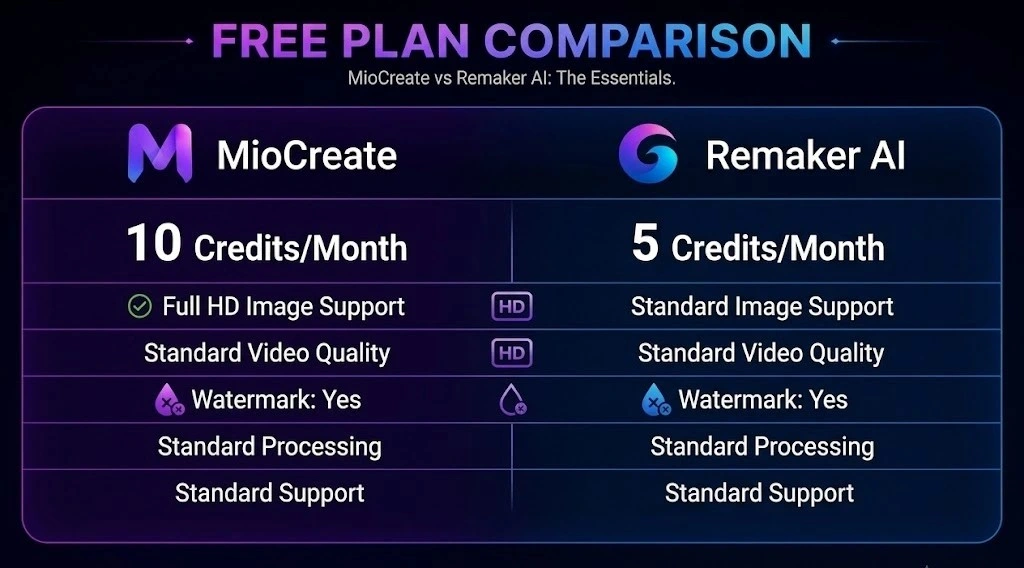
For many users, the free plan is the deciding factor. Both MioCreate and Remaker AI offer free access, but the overall experience differs depending on the features you need.
What MioCreate Offers for Free
MioCreate allows users to test its core face swap features without paying upfront. Free users can explore photo face swaps, video face swaps, and selected content creation tools before upgrading.
What Remaker AI Offers for Free
Remaker AI provides access to several image editing tools, including face swaps and photo enhancement features. Its free plan is often more attractive for users who want to experiment with multiple editing tools.
Free Plan Restrictions
Both platforms limit free usage through credits, daily quotas, or feature restrictions. Premium features, higher-quality exports, and larger workloads generally require paid credits or subscriptions.
| Free Plan Factor | MioCreate | Remaker AI |
| Photo Face Swap | ✅ | ✅ |
| Video Face Swap | ✅ | ✅ |
| Image Editing Tools | Limited | More Extensive |
| Free Credits | Limited | More Generous |
| Beginner-Friendly | ✅ | ✅ |
| Premium Feature Restrictions | Yes | Yes |
Which Free Plan Is Better?
For users focused mainly on face swaps, MioCreate’s free plan is sufficient for testing the platform. However, for overall free usage and access to a wider range of tools, Remaker AI offers the stronger free plan.
| Category | Winner |
| Free Face Swaps | Tie |
| Free Editing Tools | Remaker AI |
| Free Credits | Remaker AI |
| Ease of Testing Features | MioCreate |
| Overall Free Plan | Remaker AI |
Pros and Cons
Both MioCreate and Remaker AI offer strong face swap capabilities, but they excel in different areas. MioCreate focuses on simplicity and content creation, while Remaker AI provides a broader collection of image editing tools.
MioCreate Pros and Cons
| Pros | Cons |
|---|---|
| Easy to use for beginners | Limited free usage |
| Strong video face swap features | Fewer image editing tools |
| Fast processing speeds | Advanced controls are limited |
| Clean and simple interface | Credit-based usage |
| Multiple face swap support | Results depend on image quality |
| Good value for money | Not ideal for professional editing |
Remaker AI Pros and Cons
| Pros | Cons |
|---|---|
| Strong face swap quality | Interface can feel crowded |
| More image editing tools | Learning curve is slightly higher |
| AI headshot generation | Some tools consume credits quickly |
| Background and object removal | Video tools are less polished |
| Generous free plan | Processing speed can vary |
| Better for image enhancement | Can become expensive for heavy users |
Who Should Choose MioCreate?
MioCreate is the better choice for users who want a simple, fast, and content-focused face swap platform. It requires minimal setup and makes creating visual content easy, even for beginners.
Best for Content Creators
MioCreate is ideal for creators who regularly produce short-form content, memes, promotional visuals, and social media posts. Its fast workflow helps reduce editing time and speed up content production.
Best for Social Media Users
Users creating content for TikTok, Instagram, Facebook, and X will appreciate MioCreate’s simplicity. Most face swaps can be completed in just a few clicks without technical skills.
Best for Quick Face Swaps
If your primary goal is swapping faces in photos or videos as quickly as possible, MioCreate offers one of the most straightforward experiences in this category.
Best for All-in-One Content Creation
Beyond face swaps, MioCreate includes tools such as video generation, voice creation, and creative media features. Users looking for multiple content creation tools in one platform will find it a practical choice.
| User Type | Recommended? |
| Content Creators | ✅ Excellent |
| Social Media Users | ✅ Excellent |
| Meme Creators | ✅ Excellent |
| YouTube Creators | ✅ Excellent |
| Small Businesses | ✅ Good |
| Marketing Teams | ✅ Good |
| Professional Photo Editors | ❌ Limited |
| Advanced Designers | ❌ Limited |
Who Should Choose Remaker AI?
Remaker AI is a better fit for users who need more than face swaps. Its broader collection of image editing and enhancement tools makes it suitable for photo-focused projects and professional-looking visuals.
Best for Image Editing
Remaker AI is ideal for users who frequently edit photos, remove backgrounds, enhance images, or create polished visual content. It offers more image editing flexibility than MioCreate.
Best for Free Users
Users looking to maximize free usage will find Remaker AI appealing. Its free plan provides access to a wider range of tools before requiring a paid upgrade.
Best for AI Headshots
Remaker AI is a strong option for creating professional headshots for LinkedIn profiles, business websites, resumes, and personal branding.
Best for Advanced Photo Enhancement
For image restoration, upscaling, object removal, and photo improvement, Remaker AI offers more specialized tools and greater editing capabilities.
| User Type | Recommended? |
| Photo Editors | ✅ Excellent |
| Free Users | ✅ Excellent |
| AI Headshot Users | ✅ Excellent |
| Marketing Designers | ✅ Good |
| Small Businesses | ✅ Good |
| Content Creators | ✅ Good |
| Video-First Creators | ❌ Limited |
| Casual Face Swap Users | ⚠️ May Be More Than Needed |
Real-World Use Cases
Both MioCreate and Remaker AI can be used for much more than simple face swaps. From social media content to marketing campaigns, each platform helps users create engaging visuals with minimal editing effort.
Creating Social Media Content
Creators can use both tools to produce eye-catching images and short videos for platforms like TikTok, Instagram, Facebook, and X. MioCreate has a slight advantage thanks to its content-focused workflow and video tools.
Making Face Swap Memes
Face swap memes remain one of the most popular use cases. Both platforms make it easy to create humorous, shareable content by placing familiar faces into unexpected situations.
Marketing and Advertising Content
Businesses can use face swaps, custom visuals, and branded content to attract attention and improve engagement. Remaker AI offers more image editing flexibility, while MioCreate focuses on speed and simplicity.
YouTube Thumbnail Creation
Both tools can help create unique thumbnail concepts and promotional visuals. Remaker AI is stronger for image enhancement, while MioCreate is better for quick content production.
Personalized Visual Content
Users can create personalized greetings, social posts, profile pictures, and creative projects by customizing photos and videos with face swap technology.
Business Branding Projects
Small businesses and marketing teams can use both platforms to create branded visuals, promotional materials, and social media assets without relying on complex design software.
| Use Case | Better Choice |
| Social Media Content | MioCreate |
| Face Swap Memes | Tie |
| Marketing Content | Remaker AI |
| YouTube Thumbnails | Remaker AI |
| Personalized Visuals | Tie |
| Business Branding | Remaker AI |
| Quick Content Creation | MioCreate |
Safety and Privacy Comparison
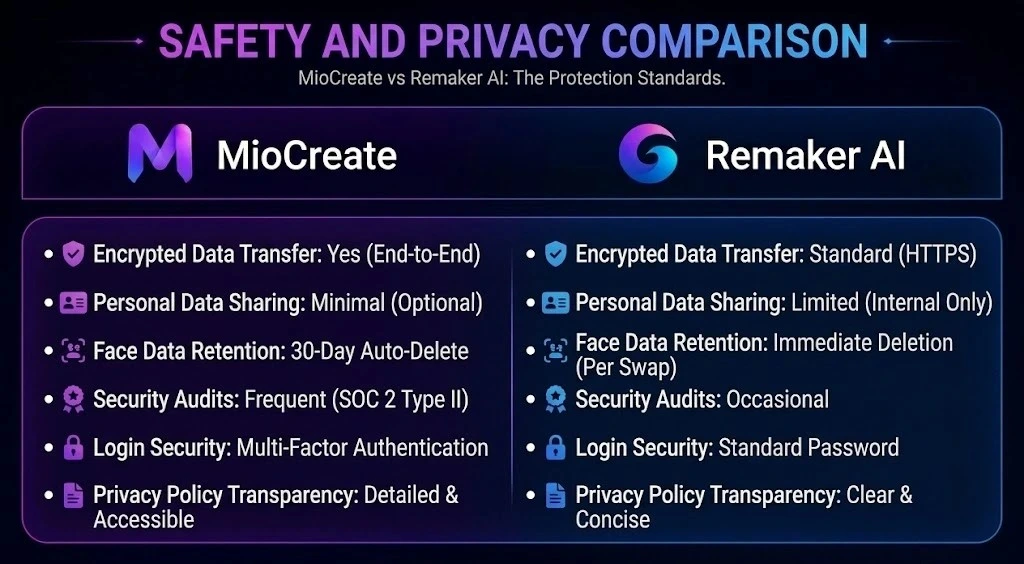
When using face swap tools, privacy is just as important as output quality. Users should understand how uploaded files are handled and what protections are in place before sharing personal photos or videos.
Is MioCreate Safe?
MioCreate appears safe for general use and provides information about user privacy and data protection. The platform is suitable for everyday content creation, though users should avoid uploading highly sensitive personal images.
Is Remaker AI Safe?
Remaker AI is also widely used for image editing and face swap projects. It provides privacy-related information and security measures designed to protect user content during processing.
Data Handling Policies
Both platforms publish privacy policies explaining how user data is processed and managed. Users should review the latest policy directly from the provider, as data practices can change over time.
Uploaded Image Retention
According to publicly available information, uploaded files are processed to generate results and are not intended for permanent storage. However, retention periods and handling practices may vary, so checking the latest policy is recommended.
User Privacy Considerations
For maximum privacy, avoid uploading confidential documents, personal identification photos, or sensitive business materials. Both platforms are best suited for creative projects, marketing content, and general-purpose image editing.
| Privacy Factor | MioCreate | Remaker AI |
| Published Privacy Policy | ✅ | ✅ |
| Secure File Processing | ✅ | ✅ |
| User Account Required for Basic Use | Limited | Limited |
| Commercial Usage Supported | ✅ | ✅ |
| Suitable for General Content Creation | ✅ | ✅ |
Safety Verdict
From a privacy and security perspective, both platforms are comparable. Neither shows a significant advantage, making this category effectively a tie for most users.
MioCreate vs Remaker AI vs Alternatives
While MioCreate and Remaker AI are strong options, they are not the only tools in this space. Depending on your priorities, some alternatives may offer a better fit for face swaps, image editing, or content creation.
MioCreate vs Reface
Reface is one of the most popular face swap apps for mobile users. It focuses on entertainment, quick face swaps, and social sharing. MioCreate offers more content creation features and stronger video face swap capabilities.
Winner: MioCreate
MioCreate vs DeepSwap
DeepSwap is known for producing highly realistic face swaps and detailed facial replacements. It is a better choice for users focused purely on face swap quality, while MioCreate provides a more balanced all-in-one experience.
Winner: DeepSwap (Quality) | MioCreate (Overall Value)
Remaker AI vs FaceApp
FaceApp specializes in portrait editing, aging effects, and facial transformations. Remaker AI offers a broader collection of image editing and face swap tools, making it more versatile for creators.
Winner: Remaker AI
Remaker AI vs Picsart
Picsart is a complete photo editing platform with extensive design tools. Remaker AI is easier for users specifically looking for face swaps, AI headshots, and image enhancement without learning advanced editing.
Winner: Remaker AI (Face Swaps) | Picsart (Design Tools)
Best Alternative Overall
For most users, MioCreate remains the strongest all-around choice thanks to its balance of face swap quality, video support, ease of use, and value for money. However, users focused on advanced image editing may prefer Remaker AI, while those seeking maximum face swap realism may lean toward DeepSwap.
| Tool | Best For |
| MioCreate | Overall Value & Video Face Swaps |
| Remaker AI | Image Editing & AI Headshots |
| Reface | Mobile Face Swaps |
| DeepSwap | Face Swap Quality |
| FaceApp | Portrait Editing |
| Picsart | Advanced Design Projects |
Common Problems and Limitations
No face swap tool is perfect. Both MioCreate and Remaker AI perform well in most situations, but certain image types, video conditions, and usage limits can affect the final results.
Face Swap Accuracy Issues
Face swap quality depends heavily on the source image. Poor lighting, hidden faces, extreme angles, sunglasses, and blurry photos can reduce accuracy on both platforms.
Video Processing Limitations
Video face swaps require more processing power than image swaps. Longer videos, fast movements, and crowded scenes may result in occasional tracking inconsistencies or longer rendering times.
Credit Consumption Concerns
Both platforms use credits for premium features. Users creating large volumes of content may find credits depleting quickly, especially when working with videos or high-resolution outputs.
Quality Loss in Low-Resolution Images
Low-quality source images often produce weaker results. Face details, skin textures, and facial features may appear less natural when the original image lacks clarity.
Situations Where Results May Vary
Situations Where Results May Vary
| Limitation | MioCreate | Remaker AI |
| Side Profile Accuracy | Moderate | Good |
| Low-Resolution Images | Moderate | Good |
| Long Video Processing | Moderate | Moderate |
| Credit Consumption | Moderate | Higher |
| Complex Group Photos | Good | Good |
| Difficult Lighting Conditions | Moderate | Good |
Bottom Line
Neither platform struggles with standard portraits or well-lit images. Most limitations appear when working with challenging source files, long videos, or complex editing scenarios.
Final Verdict: MioCreate or Remaker AI?
MioCreate and Remaker AI are both capable face swap platforms, but they target different users. MioCreate stands out for its simplicity, video face swap features, and overall ease of use. Remaker AI offers a broader set of image editing tools and stronger photo enhancement capabilities.
For most users, content creators, and social media marketers, MioCreate provides the better overall experience and value for money. If your focus is advanced image editing, AI headshots, and photo enhancement, Remaker AI is the stronger choice. Ultimately, the best tool depends on whether you prioritize content creation or image editing.