MioCreate Review 2026: Is This AI Face Swap Tool Actually Worth Using?
Last Updated: May 3, 2025
Tested, Reviewed & Written by SaaS & Software Reviews Editorial Team
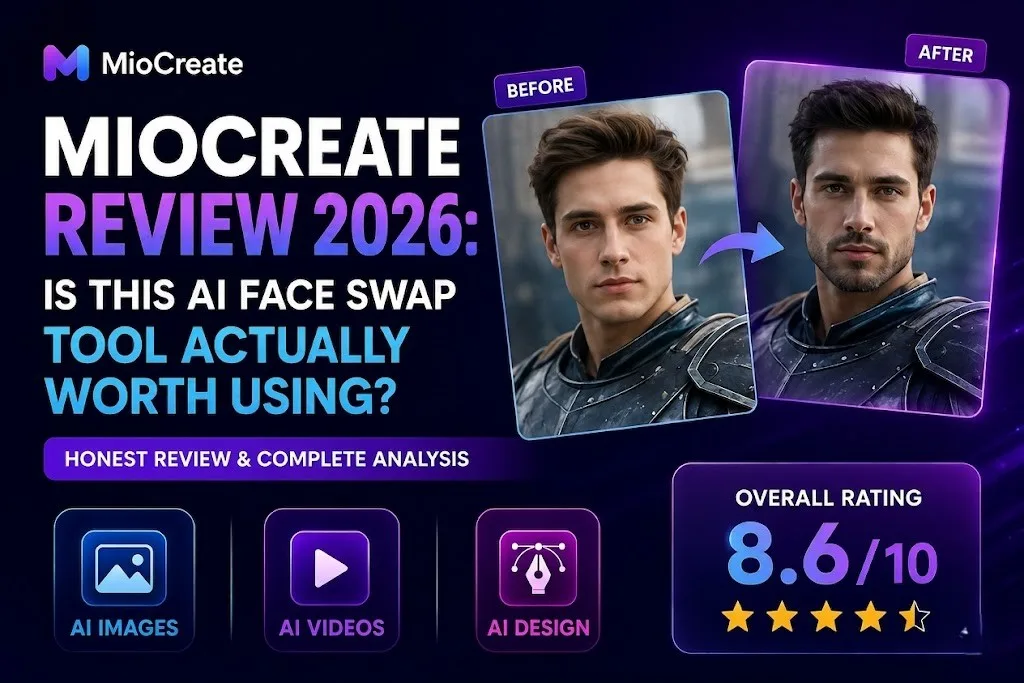
If you need a simple way to swap faces in photos and videos, MioCreate is worth a look. It combines photo face swaps, video face swaps, and multi-face editing in one easy-to-use platform.
After testing its features, pricing, and performance, we found it works best for content creators, social media users, and small businesses looking for fast, affordable results.
MioCreate Review: Quick Verdict
- Easy for beginners to use
- Supports photo and video face swaps
- Multiple face swap option for group photos
- Fast processing times
- Affordable paid plans
- Works directly in a web browser
- Free usage is limited
- Results can vary with low-quality images
- Credit-based system may not suit heavy users
- Advanced editing controls are limited
Who Can Use MioCreate?
| User Type | Recommended? |
|---|---|
| Content Creators | ✅ Yes |
| Social Media Managers | ✅ Yes |
| YouTubers | ✅ Yes |
| Meme Creators | ✅ Yes |
| Small Businesses | ✅ Yes |
| Marketing Teams | ✅ Yes |
| Professional VFX Artists | ❌ No |
| Advanced Video Editors | ❌ No |
Our Final Verdict in 60 Seconds
MioCreate stands out as an easy-to-use face swap tool that delivers surprisingly good results for most everyday users. Its biggest strengths are simplicity, fast processing, and support for both photo and video face swaps.
If your goal is creating social media content, memes, marketing assets, or personalized visuals without spending hours editing, MioCreate offers solid value. For advanced production work, dedicated editing software will still be the better choice.
What Is MioCreate?
| Feature | Best For | Difficulty |
|---|---|---|
| Photo Face Swap | Social media content | Easy |
| Video Face Swap | Short-form videos | Easy |
| Multi-Face Swap | Group photos | Easy |
| Voice Generator | Narrations | Easy |
| Dance Generator | Viral content | Easy |
| Text-to-Video | Quick video creation | Easy |
| Image Combiner | Marketing visuals | Easy |
MioCreate is an online content creation platform best known for its photo and video face swap tools. It lets users replace faces, create short videos, generate voiceovers, and experiment with creative media without needing professional editing skills.
What MioCreate Does
MioCreate helps users create and edit visual content in just a few clicks. From swapping faces in images to generating videos and animations, it focuses on making content creation faster and easier for everyday users.
Key AI Tools Included in MioCreate
Some of MioCreate’s most popular tools include:
Who MioCreate Is Designed For
MioCreate is built for content creators, social media users, marketers, YouTubers, meme creators, and small businesses that want engaging content without spending hours editing.
How MioCreate Differs From Traditional Editing Software
Unlike traditional editing programs that require manual work and a learning curve, MioCreate automates most of the process. You upload your files, choose an option, and get results in minutes directly from your browser.
Our Hands-On Experience With MioCreate
| Test Category | Result |
|---|---|
| Portrait Face Swap | Excellent |
| Group Face Swap | Very Good |
| Video Face Swap | Good |
| Face Detection Accuracy | Very Good |
| Processing Speed | Fast |
| Mobile Experience | Excellent |
| Desktop Experience | Excellent |
| Beginner Friendliness | Excellent |
To see how well MioCreate performs in real-world situations, we tested its most popular tools, including photo face swaps, video face swaps, multi-face editing, voice generation, and text-to-video creation. Our goal was simple: find out whether the platform delivers good results without requiring advanced editing skills.
How We Tested MioCreate
We tested MioCreate using different image types, short video clips, group photos, and text prompts. We focused on ease of use, output quality, speed, and consistency across multiple use cases.
Testing Environment and Methodology
All tests were performed through the web version using standard desktop and mobile browsers. We used both high-quality and average-quality media files to evaluate how the platform handled different scenarios.
Face Swap Accuracy Test
In most cases, face swaps looked natural and blended well with the original image. Results were strongest when the source photos had clear faces and good lighting.
Video Face Swap Performance Test
Video face swaps were processed quickly and maintained good facial alignment throughout short clips. Some complex scenes showed minor inconsistencies, but overall quality remained impressive for casual use.
Multi-Face Swap Test
Group photo face swaps worked surprisingly well. MioCreate correctly detected multiple faces and handled replacements with minimal manual effort.
AI Voice Generator Test
The voice generator produced clear audio suitable for short videos, presentations, and social content. Voice quality was decent, though not as advanced as dedicated voice cloning tools.
Text-to-Video Test
The text-to-video feature made it easy to turn simple prompts into short visual content. While basic compared to specialized video generators, it offered a quick way to create shareable clips.
Processing Speed Results
One of MioCreate’s biggest strengths is speed. Most image-based tasks were completed within seconds, while video processing remained reasonably fast for short clips.
Overall User Experience
MioCreate is easy to navigate, beginner-friendly, and requires very little setup. Most users can start creating content within minutes, making it a practical choice for social media, marketing, and everyday creative projects.
MioCreate Features Explained
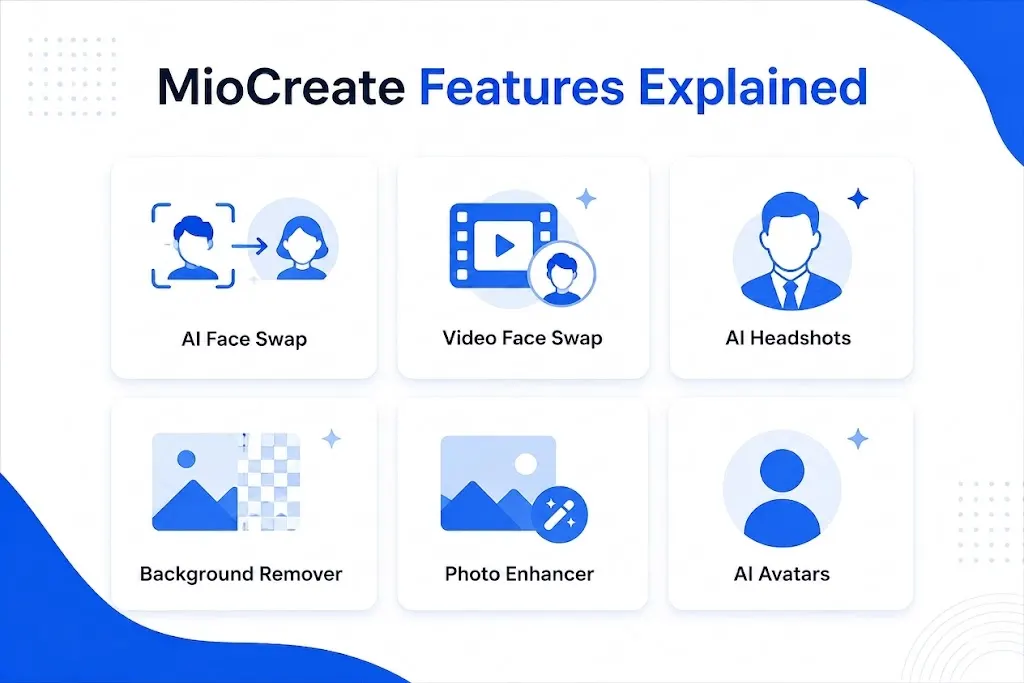
MioCreate offers more than simple face swapping. It includes several creative tools designed for content creators, marketers, and everyday users who want fast results without complex editing.
AI Face Swap
The face swap tool is MioCreate’s main attraction. It allows users to replace faces in images with just a few clicks while keeping the final result natural and recognizable.
Photo Face Swap
Photo face swaps are quick to create and require no editing experience. Simply upload your images, select the faces, and let the platform handle the rest.
Face Swap Quality and Realism
In our testing, face swaps looked convincing when the source images had clear facial details and decent lighting. Skin tones and facial positioning were generally handled well.
Face Swap Accuracy in Different Scenarios
Results were strongest with portraits, selfies, and well-lit photos. Accuracy dropped slightly when working with side profiles, blurry images, or crowded backgrounds.
AI Video Face Swap
MioCreate also supports video face replacement, allowing users to swap faces throughout an entire clip instead of a single image.
Video Quality Results
Most video outputs maintained good facial alignment and looked natural during normal movements.
Processing Time
Short clips were processed fairly quickly, making the tool practical for social media content and short-form videos.
Motion Consistency
Face tracking remained stable in simple scenes, though fast movements occasionally produced minor visual artifacts.
AI Multi-Face Swap
This feature makes it possible to replace several faces at once in group photos and videos.
Group Photo Testing
The tool detected multiple faces accurately and completed swaps without requiring manual adjustments.
Group Video Testing
Group video swaps worked well in simple scenes where faces remained visible throughout the clip.
AI Voice Generator
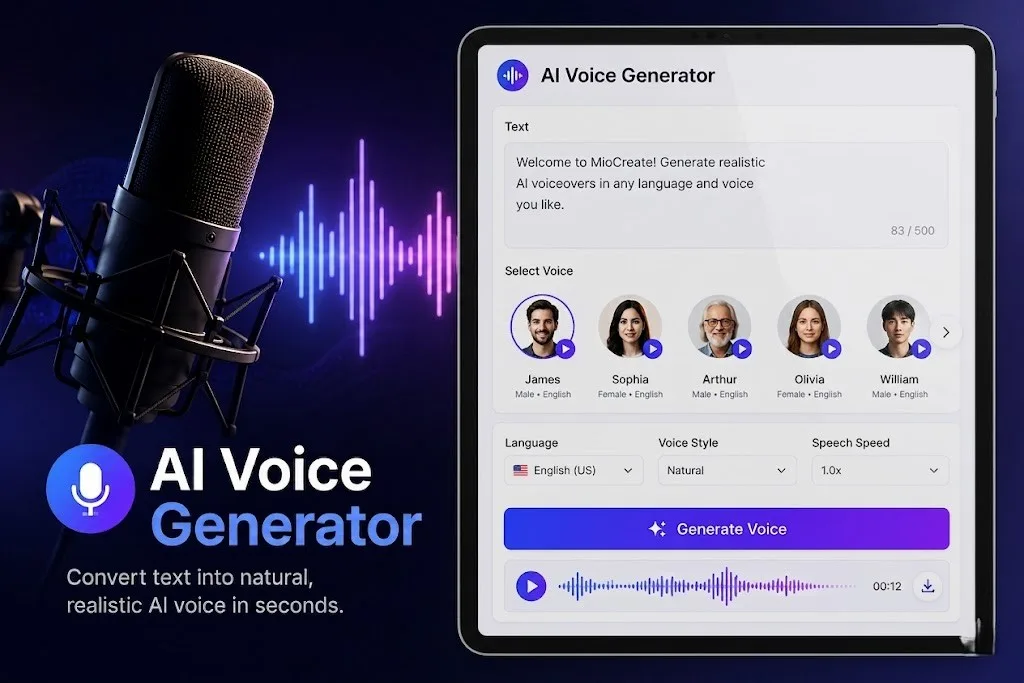
The voice generator helps users create spoken audio without recording their own voice.
Voice Quality
Generated voices sounded clear and understandable for basic content creation needs.
Available Voice Styles
Users can choose from different voice tones and speaking styles depending on the type of content they want to create.
Best Use Cases
Ideal for short narrations, social media videos, presentations, and simple voiceovers.
AI Dance Generator
The dance generator turns static images into animated dancing clips.
Animation Quality
Animations were smooth enough for casual content and social sharing.
Content Creation Applications
Useful for memes, entertainment content, and engagement-focused social media posts.
AI Text-to-Video Generator
This feature converts written prompts into short video content.
Ease of Use
The process is straightforward and beginner-friendly, requiring only a simple text prompt.
Output Quality
Results are suitable for basic promotional content, social posts, and quick visual storytelling.
AI Image Combiner
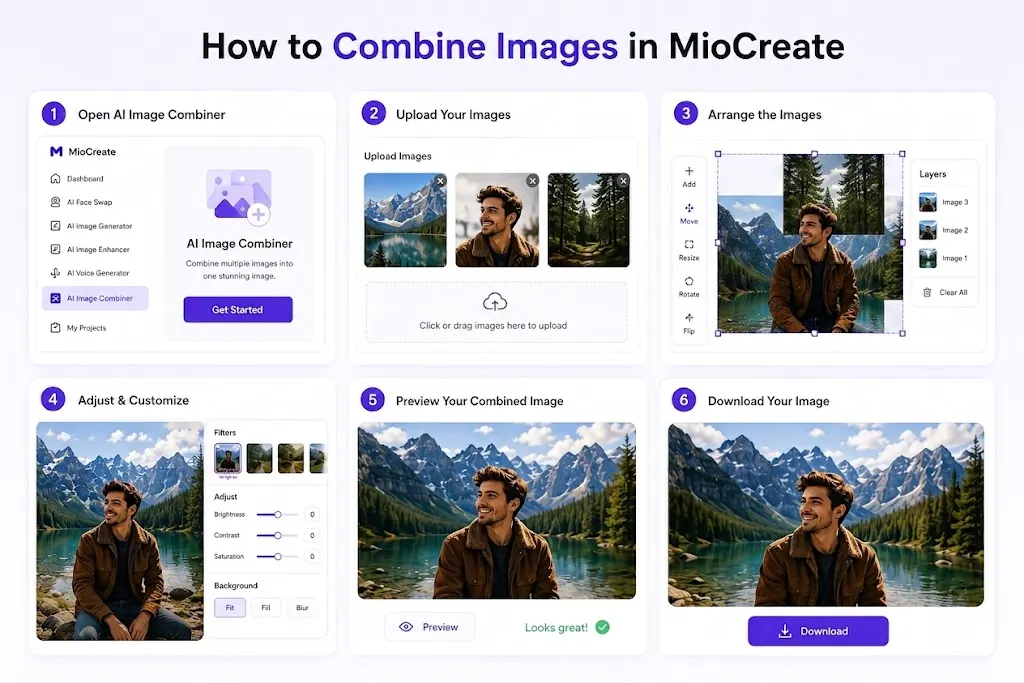
The image combiner merges multiple images into a single composition.
Image Combiner
The image combiner merges multiple images into a single composition.
Creative Use Cases
Helpful for creating collages, marketing visuals, mood boards, and promotional graphics.
Image Blending Quality
Images blended smoothly in most cases and required little manual editing.
AI Attractiveness Test
The attractiveness test analyzes facial features and generates a score for entertainment purposes.
How It Works
Users upload a photo, and the tool evaluates facial characteristics using automated analysis.
Entertainment Value
While not a professional assessment tool, it can be a fun addition for social sharing and casual engagement.
MioCreate Performance Review
Beyond features, performance plays a major role in the overall experience. We evaluated MioCreate based on face swap quality, processing speed, consistency, and usability across different devices and image types.
Face Swap Quality Score
Overall, MioCreate delivers realistic face swaps for everyday content creation. Results looked most natural when using clear, front-facing photos with good lighting and facial visibility.
Video Rendering Speed
Video processing was reasonably fast compared to many browser-based face swap tools. Short clips were rendered within minutes, making the platform suitable for social media and quick content projects.
Accuracy Under Different Lighting Conditions
MioCreate handled well-lit photos with strong accuracy. Performance remained solid under moderate lighting, though heavily shadowed or overexposed images occasionally reduced realism.
Performance With Low-Quality Images
The platform can process lower-quality images, but output quality depends heavily on the source file. Blurry, compressed, or heavily edited photos may produce less convincing results.
Performance With Group Photos
Group photo performance was one of MioCreate’s stronger areas. The platform detected multiple faces accurately and completed swaps with minimal manual input.
Performance on Mobile Devices
MioCreate worked smoothly on mobile browsers and remained easy to use on smaller screens. Most features were accessible without noticeable performance issues.
Performance on Desktop Browsers
The best experience came from desktop use, where uploads, processing, and previewing felt faster and more comfortable. Users working with videos or multiple files will likely prefer the desktop version.
Is MioCreate Easy To Use?
One of MioCreate’s biggest strengths is its simplicity. Most features are designed for beginners, making it possible to create face swaps, videos, and other content without any editing experience.
First-Time User Experience
Getting started is straightforward. Users can upload their files, choose a tool, and generate content within minutes. No software installation or complicated setup is required.
Interface and Navigation
The interface is clean and easy to navigate. Tools are clearly organized, and most features can be accessed in just a few clicks, even on a first visit.
Learning Curve
MioCreate has a very short learning curve. Most users can understand the workflow almost immediately without relying on tutorials or technical guides.
Beginner Friendliness
For beginners, MioCreate is one of the easier face swap platforms to use. Its simple workflow and automated processing make it a good option for anyone creating content without advanced editing skills.
MioCreate Pricing Review
MioCreate offers both free and paid plans, making it accessible to casual users as well as content creators who need more credits and higher usage limits.
| Plan | Price | Credits | Best For |
|---|---|---|---|
| Free | $0 | Limited | Testing features |
| Monthly | $4.99 | 80 Credits | Casual users |
| Half-Yearly | $12.99 | 350 Credits | Active creators |
| Annual | $19.99 | 1000 Credits | Heavy users |
Is MioCreate Free?
Yes, MioCreate offers a free plan that allows users to test core features before committing to a paid subscription. It’s a good starting point for exploring the platform and checking output quality.
Free Plan Limitations
The free version comes with usage restrictions, including limited credits and reduced access to premium features. Heavy users may quickly reach the free plan’s limits.
Monthly Plan Breakdown
The monthly plan includes 80 credits for $4.99 per month. It’s best suited for occasional users who create face swaps, short videos, or social media content on a regular basis.
Half-Yearly Plan Breakdown
The half-yearly plan provides 350 credits for $12.99 per month. It offers a lower cost per credit and works well for active creators who need more frequent access to the platform.
Annual Plan Breakdown
The annual plan includes 1,000 credits for $19.99 per month equivalent pricing. This option delivers the best overall value and is ideal for marketers, content creators, and business users with ongoing content needs.
Cost Per Credit Analysis
As subscription length increases, the cost per credit decreases. The annual plan offers the lowest cost per credit, making it the most economical choice for long-term users.
Is MioCreate Good Value for Money?
For users who regularly create face swaps, short videos, and social media content, MioCreate offers solid value. The combination of multiple creative tools, simple workflow, and affordable pricing makes it a competitive option in the face swap software market.
MioCreate Pros and Cons
Like most face swap platforms, MioCreate has clear strengths and a few limitations. After testing its core features, here’s where it performs well and where there is still room for improvement.
Advantages
- Simple and beginner-friendly interface
- Supports both photo and video face swaps
- Multi-face swap feature works well for group content
- Fast processing for most tasks
- No software installation required
- Affordable plans for casual creators
- Includes extra tools like voice generation and text-to-video
Drawbacks
- Free usage is limited
- Credit-based system may not suit heavy users
- Advanced editing controls are limited
- Some features require a paid subscription
- Output quality depends heavily on source media
Limitations We Found During Testing
During testing, MioCreate performed best with clear, high-quality images and short video clips. Results became less consistent when using blurry photos, extreme face angles, crowded scenes, or poor lighting conditions. While the platform delivers strong results for everyday content creation, professionals needing precise editing control may find dedicated editing software more suitable.
Who Should Use MioCreate?
MioCreate is designed for users who want to create engaging visual content without spending hours learning complex editing software. Its simple workflow makes it suitable for both personal and professional use.
Content Creators
Content creators can use MioCreate to produce eye-catching photos, short videos, and creative content faster. It’s especially useful for platforms where fresh content is needed regularly.
Social Media Managers
Social media managers can quickly create attention-grabbing posts, face swap campaigns, and shareable visuals that help increase engagement across multiple platforms.
Meme Creators
For meme creators, MioCreate provides a fast way to generate humorous face swaps and trending content without advanced editing skills.
Influencers
Influencers can use MioCreate to create unique posts, personalized visuals, and interactive content that helps keep their audience engaged.
Small Businesses
Small businesses can use MioCreate to create promotional graphics, branded visuals, and social media content without hiring a designer for every project.
Marketing Teams
Marketing teams can leverage MioCreate for creative campaigns, personalized advertisements, and audience-focused content while reducing production time.
YouTube Creators
YouTube creators can use MioCreate to create thumbnail concepts, promotional visuals, short-form content, and audience engagement posts that stand out in crowded feeds.
Real-World MioCreate Use Cases

MioCreate is more than a face swap tool. It can be used across social media, marketing, entertainment, and content creation to produce engaging visuals with minimal effort.
Creating Viral Social Media Content
Creators can use MioCreate to turn ordinary photos and videos into attention-grabbing content. Face swaps, animated clips, and creative edits often perform well on platforms like TikTok, Instagram, and Facebook.
Personalized Marketing Campaigns
Businesses can create personalized visuals that feel more relevant to their audience. This can help improve engagement and make promotional content more memorable.
AI Face Swap Memes
Face swap memes remain one of the most popular uses for MioCreate. Users can quickly create funny, shareable content by placing familiar faces into unexpected situations.
YouTube Thumbnail Experiments
YouTube creators can test different thumbnail concepts, character swaps, and creative visual ideas before investing time in more advanced design work.
Promotional Content Creation
MioCreate can help create product promotions, event announcements, and social media advertisements without requiring professional editing software.
Brand Engagement Campaigns
Brands can use face swap content, personalized visuals, and interactive media to encourage audience participation, increase social engagement, and create more memorable marketing campaigns.
Is MioCreate Safe and Legit?
MioCreate is a legitimate online platform that offers face swapping and content creation tools through a web browser. While it provides useful creative features, users should still understand how their data is handled and follow responsible content creation practices.
Is MioCreate Legit?
Yes, MioCreate is a real platform used by thousands of users for photo editing, video face swaps, and creative content generation. During our review, the platform functioned as advertised and delivered the features it promotes.
Privacy Policy Analysis
MioCreate states that user privacy is a priority and outlines its data practices through its privacy policy. As with any platform that processes images or videos, users should review the latest policy before uploading sensitive content.
Does MioCreate Store Uploaded Images?
According to MioCreate’s published information, uploaded files are not intended for permanent storage without user authorization. However, users should always verify current policies directly from the platform, as privacy practices can change over time.
Data Security and User Protection
MioCreate uses standard web security measures to protect user activity and file transfers. For additional privacy, avoid uploading highly sensitive personal images or confidential business materials.
Ethical Use Considerations
Face swap technology should be used responsibly. Users should avoid creating misleading, deceptive, or unauthorized content involving other individuals without permission.
Commercial Usage Rights
MioCreate can be used for commercial content creation, marketing materials, and business projects. Before publishing content commercially, users should review the platform’s terms of service and ensure they have the rights to use all source images, videos, and likenesses involved.
MioCreate vs Competitors
While MioCreate focuses on face swaps and quick content creation, several competitors offer similar features. Here’s how it compares in the areas that matter most.
Which Produces Better Face Swaps?
Reface often delivers slightly more polished results for short clips and celebrity-style face swaps. MioCreate performs better for users who want both photo and video face swapping in one platform.
Which Is Easier To Use?
Both tools are beginner-friendly, but Reface feels more app-focused, while MioCreate offers greater flexibility through its web-based interface.
Which Offers Better Value?
MioCreate provides more content creation tools beyond face swapping, making it the better value for users who need multiple features under one subscription.
MioCreate vs DeepSwap
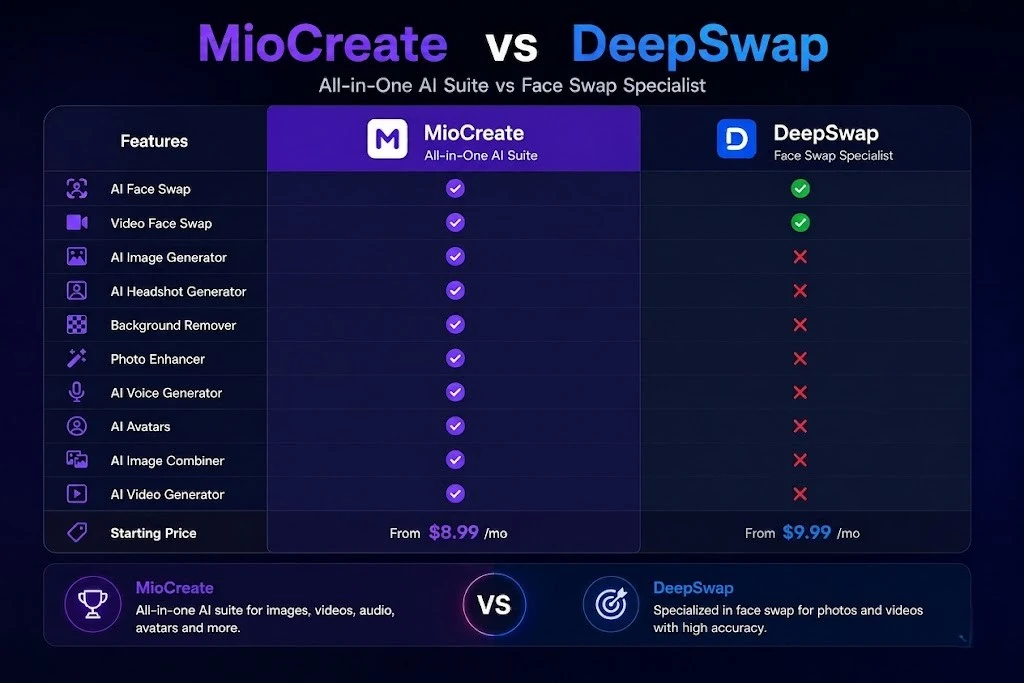
DeepSwap is known for realistic face replacements and supports advanced face swap projects.
Face Swap Quality Comparison
DeepSwap generally produces more refined results for professional-looking face swaps. MioCreate focuses more on speed, simplicity, and accessibility.
Pricing Comparison
MioCreate is typically more affordable for casual users and creators who do not need advanced editing capabilities.
Feature Comparison
MioCreate includes additional tools such as voice generation, text-to-video, and image combining, while DeepSwap focuses primarily on face replacement.
MioCreate vs Remaker AI
Both platforms support image and video face swaps, but they target slightly different audiences.
Photo Face Swap Comparison
MioCreate offers a simpler workflow for beginners, while Remaker AI provides more editing-focused options for users who want additional control.
Video Face Swap Comparison
Both tools perform well for short videos, though MioCreate’s interface is generally easier for first-time users to navigate.
MioCreate vs Vidnoz AI
Vidnoz AI is primarily known for video creation, avatars, and presentation content.
AI Content Creation Comparison
Vidnoz offers stronger video production features, while MioCreate focuses more on face swaps and quick visual content.
Best Choice for Marketers
Marketers creating presentations and business videos may prefer Vidnoz. Those focused on visual engagement, face swaps, and social content may find MioCreate a better fit.
MioCreate vs Magic Hour
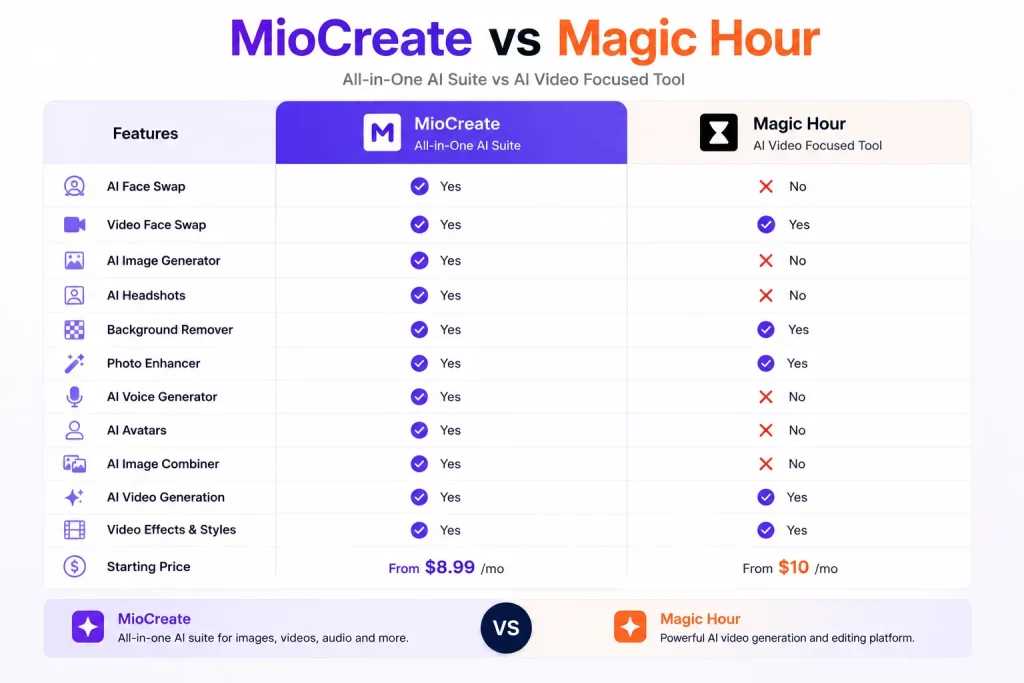
Magic Hour is popular among creators producing animated and video-based content.
Video Generation Comparison
Magic Hour offers more advanced video creation features, while MioCreate provides a simpler and faster workflow for casual users.
Overall Winner
For dedicated video creation, Magic Hour has an advantage. For ease of use and face swap-focused content, MioCreate remains the stronger all-around option.
MioCreate vs Free Face Swap Tools
Many free face swap tools exist, but they often come with watermarks, lower output quality, or strict usage limits.
Best Free Alternative
For users seeking a completely free option, tools like Remaker AI can be worth exploring, though feature availability may vary over time.
When MioCreate Is Worth Paying For
MioCreate becomes worthwhile when you need higher-quality outputs, video face swaps, multiple creative tools, and a smoother workflow without relying on several separate platforms.
Common Problems and Limitations
Like any face swap platform, MioCreate is not perfect. While it performs well in most everyday scenarios, certain image types, video conditions, and usage limits can affect the final results.
Why Face Swaps Sometimes Look Unrealistic: Face swaps rely heavily on the quality of the source images. Poor lighting, extreme face angles, hidden facial features, or low-resolution photos can make the final output appear less natural.
Common Errors During Processing: Users may occasionally encounter failed uploads, incomplete face detection, or longer processing times during peak usage periods. Most issues can be resolved by using clearer images and supported file formats.
Credit Usage Concerns: Many of MioCreate’s premium features consume credits. Users creating large volumes of content may use their monthly credits faster than expected, especially when working with videos.
Video Length Restrictions: While MioCreate supports video face swaps, longer videos require more processing resources and credits. Users creating extended content may find the platform better suited for short-form videos and social media clips.
Situations Where MioCreate Struggles: MioCreate performs best with clear faces and simple scenes. Results may become less accurate when working with crowded group shots, fast-moving subjects, heavily shadowed images, side profiles, or low-quality source files. For highly detailed commercial projects, specialized editing software may offer greater control.
MioCreate Alternatives Worth Considering
| Tool | Best For | Starting Price |
|---|---|---|
| Reface | Beginners | Freemium |
| DeepSwap | Advanced face swaps | Paid |
| Remaker AI | Free users | Freemium |
| Vidnoz AI | Marketing videos | Freemium |
| Magic Hour | Video creators | Freemium |
While MioCreate offers a solid mix of face swapping and content creation tools, it may not be the perfect fit for everyone. Depending on your goals, some alternatives may be better suited to your workflow.
Best Alternative for Beginners
Reface: Reface is one of the easiest face swap tools for new users. Its simple interface and quick setup make it a good option for people who want fast results without learning new software.
Best Alternative for Professionals
DeepSwap: DeepSwap is better suited for users who prioritize face swap quality and more advanced results. It offers stronger realism but comes with a steeper learning curve and higher costs.
Best Alternative for Video Face Swaps
Magic Hour: Magic Hour is worth considering for creators focused on video-based content. It offers more advanced video generation and animation features than most basic face swap platforms.
Best Free Alternative
Remaker AI: Remaker AI is one of the stronger free options available. It provides photo and video face swap capabilities and is often chosen by users who want to experiment before paying for a subscription.
Best Alternative for Marketing Teams
Vidnoz AI: Vidnoz AI is a strong choice for marketing teams creating business videos, presentations, training content, and avatar-based communication. Its broader video creation toolkit makes it particularly useful for professional marketing workflows.
Final Verdict: Is MioCreate Worth It in 2026?
What Impressed Us Most
MioCreate stands out for its ease of use, fast processing, and support for both photo and video face swaps. The multi-face swap feature and beginner-friendly workflow make content creation quick and accessible.
Biggest Weaknesses
The free plan is limited, and results can become less consistent with poor-quality images or complex scenes. Advanced users may also find the editing controls somewhat basic.
Who We Recommend It To
MioCreate is a strong choice for content creators, social media users, marketers, small businesses, and anyone looking for an easy way to create face swap content without learning professional editing software.
Who Should Skip It
Professional editors, VFX artists, and users who need precise manual editing or unlimited free usage may be better served by more specialized tools.
Final Rating
Overall Rating: 8.6/10
MioCreate offers a solid balance of simplicity, features, and affordability. For most users, it delivers enough functionality to create engaging content without the complexity of traditional editing platforms.