Krea AI Review (2026): Is It Worth It for Images, Videos, and Design Work?
Last Updated: June 16, 2026
Tested, Reviewed & Written by SaaS & Software Reviews Editorial Team
Krea AI makes creating visuals feel effortless. Instead of waiting on slow generations or switching between tools, you can generate, edit, enhance, and refine content in one place.
If speed matters as much as quality, Krea AI is one of the most practical options available today.
Krea AI Review Summary
Who Should Use Krea AI?
Krea AI is a strong fit for content creators, marketers, designers, YouTubers, and small business owners who need visuals quickly. It works especially well for social media graphics, ad creatives, product images, concept art, mood boards, and thumbnail design.
If your goal is to turn ideas into usable visuals in minutes instead of hours, Krea AI can save a significant amount of time.
Who Should Avoid Krea AI?
Krea AI may not be the best choice for users who need highly detailed cinematic artwork, advanced production-grade video editing, or complete control over every image parameter.
Professional concept artists and studios working on complex visual projects may find specialized tools more suitable.
If maximum artistic precision matters more than speed and workflow efficiency, there are stronger alternatives available.
What Is Krea AI?
Krea AI is a browser-based creative platform that helps users generate images, create videos, edit visuals, and enhance photos from a single workspace. Its biggest advantage is speed, allowing creators to see changes in real time instead of waiting through long generation cycles.
What Does Krea AI Do?
Krea AI combines several creative tools under one roof. You can generate images from text, improve image quality, remove or replace objects, create short videos, train custom styles, and build design assets for social media, marketing, e-commerce, and content creation.
Who Created Krea AI?
Krea AI was founded by Víctor Pérez and Diego Rodríguez with a simple goal: make visual creation faster and more accessible. The platform was built to remove technical barriers and give creators a more direct way to turn ideas into finished visuals.
How Krea AI Works
Krea AI works through a simple prompt-based workflow. Users can enter a text description, upload an image, draw a rough sketch, or edit an existing visual. The platform processes the input and generates results almost instantly, making it easy to test ideas, refine designs, and create content without switching between multiple tools.
Krea AI at a Glance
Krea AI is built for creators who want fast results without a complicated workflow. Instead of juggling multiple tools, users can generate, edit, enhance, and animate visuals from one dashboard. It is designed for speed, simplicity, and creative flexibility.
Key Features
Krea AI offers real-time image generation, image editing, photo enhancement, video creation, custom style training, logo design, pattern generation, and canvas-based editing. The platform also includes upscaling tools for improving image quality and resolution.
Supported AI Models
Krea AI supports several popular image and video models, giving users more control over quality and style. Depending on the task, creators can choose different generation engines for artwork, photorealistic images, design concepts, and video projects.
Available Platforms
Krea AI runs entirely in the browser, making it accessible on desktop, laptop, tablet, and mobile devices. There is no software installation required, allowing users to create from virtually anywhere.
Commercial Usage Rights
Paid plans include commercial usage rights, making Krea AI suitable for client work, marketing campaigns, social media content, product visuals, and business projects. Users should always review the latest licensing terms before publishing or selling generated content.
Our Hands-On Krea AI Testing Process
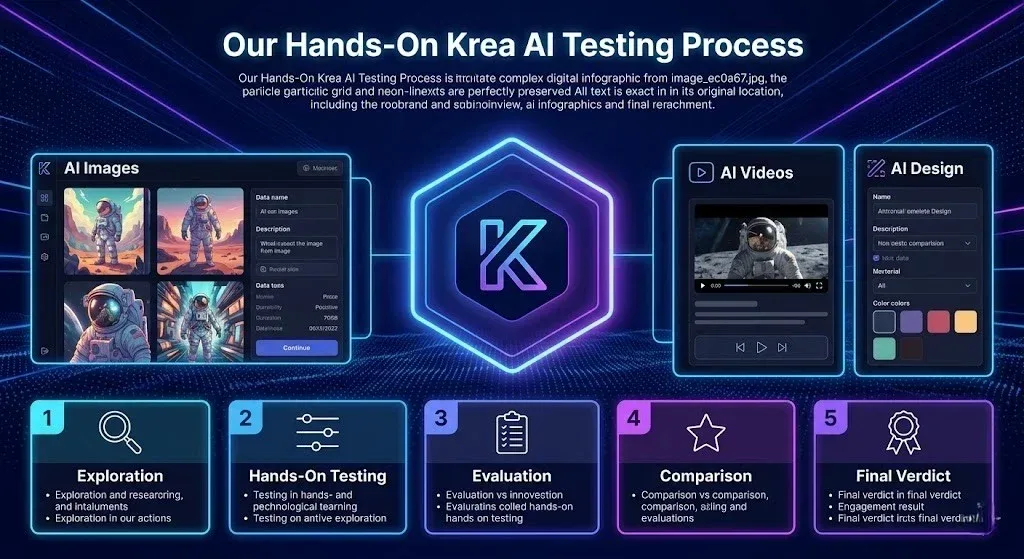
Many Krea AI reviews simply list features. We wanted to see how the platform performs in real-world situations. To create a fair assessment, we tested Krea AI across image generation, editing, enhancement, and video creation using the same workflow an everyday creator would follow.
Test Environment
All tests were performed using the browser version of Krea AI on a standard desktop setup with a stable internet connection. We evaluated both free and premium features where available and focused on speed, usability, output quality, and consistency.
Prompts Used
To measure performance across different creative tasks, we used a mix of realistic prompts, including photorealistic portraits, product photography, YouTube thumbnails, social media graphics, landscapes, text-heavy designs, and marketing visuals. We also tested image editing, background replacement, and image-to-video workflows.
Evaluation Criteria
Each feature was scored based on generation speed, visual quality, prompt accuracy, ease of use, editing flexibility, consistency, and overall value. We also compared the results against popular alternatives to determine where Krea AI excels and where it still has room for improvement.
Hands-On Testing Results
| Test | Result | Rating |
|---|---|---|
| Photorealistic Portraits | Natural facial details and lighting | |
| Product Photography | Clean compositions and backgrounds | |
| YouTube Thumbnails | Eye-catching visuals | |
| Social Media Ads | Strong creative variations | |
| Text Rendering | Accurate for short text | |
| Character Consistency | Good with custom training |
Krea AI Features Review
Krea AI packs image creation, editing, enhancement, and AI video generation tools into one streamlined workspace. The platform focuses on helping users move from idea to finished content with minimal friction.
Real-Time Image Generation
This is Krea AI’s standout feature. Instead of waiting for a finished result, you can watch images evolve as you adjust prompts, sketches, and settings. It makes experimentation faster and more intuitive.
Text-to-Image Creation
Simply describe what you want, and Krea AI turns it into a visual. It performs well for concept art, marketing graphics, social media content, and product visuals, with multiple styles available.
AI Image Editing
Need to remove an object, replace a background, or change part of an image? Krea AI makes quick edits easy without requiring advanced design skills.
Image Upscaling and Enhancement
The enhancement tool improves image quality, sharpness, and detail with just a few clicks. It’s particularly useful for restoring low-resolution images and preparing visuals for larger formats.
AI Video Generation
Krea AI supports video creation from prompts and images, making it easy to produce short clips for social media, ads, and creative projects without a complex workflow.
Image-to-Video Tool
Turn static images into animated scenes. This feature adds motion and depth, helping creators bring product photos, artwork, and illustrations to life.
Motion Transfer
Motion Transfer applies movement patterns to still images, creating more natural and engaging animations. It’s a useful tool for adding energy to otherwise static content.
Custom AI Training
Users can train custom styles using their own images. This helps maintain a consistent visual identity for personal brands, businesses, and ongoing creative projects.
AI Patterns
The pattern generator creates repeatable designs for packaging, textiles, wallpapers, backgrounds, and digital assets, saving hours of manual design work.
Logo Generator
Krea AI can transform logos into creative visual concepts and branded scenes. It’s particularly useful for marketing campaigns, mockups, and social media content.
Canvas Editor
The Canvas Editor combines drawing, editing, and image generation in one workspace. It gives users more control over composition while keeping the creative process fast and flexible.
Krea AI Key Features Overview
| Feature | Available |
|---|---|
| Real-Time Image Generation | Yes |
| Text-to-Image | Yes |
| Image Editing | Yes |
| Image Upscaling | Yes |
| Video Generation | Yes |
| Image-to-Video | Yes |
| Motion Transfer | Yes |
| Custom Style Training | Yes |
| Logo Generator | Yes |
| Pattern Generator | Yes |
| Canvas Editor | Yes |
Real-World Performance Tests
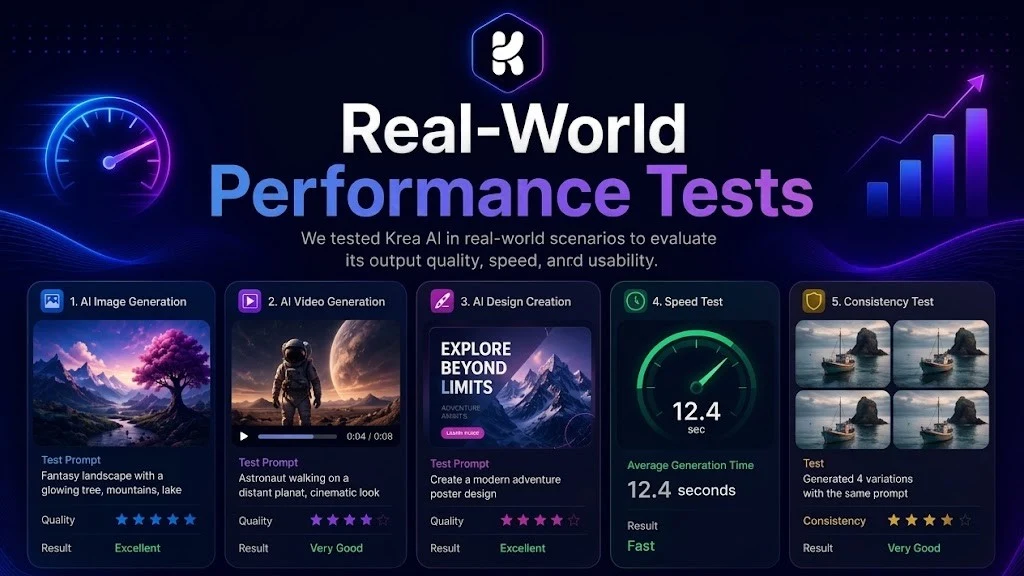
Features only tell part of the story. To understand how Krea AI performs in everyday use, we tested it across several common content creation tasks. The goal was to evaluate speed, quality, consistency, and practical usability.
Photorealistic Portrait Test
Krea AI produced realistic portraits with good lighting, natural skin tones, and strong facial detail. Most results looked convincing, though occasional imperfections appeared in complex facial expressions and fine details.
Product Photography Test
Product images turned out clean and visually appealing. Krea AI handled reflections, backgrounds, and composition well, making it suitable for e-commerce listings, product mockups, and advertising visuals.
YouTube Thumbnail Test
Krea AI generated attention-grabbing visuals quickly. It performed best when creating dramatic scenes, expressive faces, and bold compositions that work well for YouTube content.
Social Media Ad Creative Test
The platform created high-quality ad concepts in minutes. It was particularly effective for generating multiple creative variations for testing different marketing angles.
Text Rendering Test
Text generation has improved, but results still vary depending on prompt complexity. Short words and simple designs performed better than longer text-heavy graphics.
Character Consistency Test
Using custom style training improved consistency significantly. Without training, character appearance could vary across generations, especially in different poses or scenes.
Krea AI Image Quality Review
Image quality is where Krea AI balances speed and usability. While some platforms focus purely on artistic output, Krea AI prioritizes fast iteration without sacrificing too much visual quality. In our testing, the results were consistently strong for most creative and commercial use cases.
Realism
Krea AI generates realistic images with convincing textures, facial details, and environmental elements. Portraits, lifestyle scenes, and product visuals generally look natural, especially when using detailed prompts.
Lighting and Composition
One of Krea AI’s strengths is its ability to create visually balanced scenes. Most outputs feature natural lighting, good subject placement, and compositions that require minimal editing.
Anatomy Accuracy
Human figures are generally well rendered, especially in simple poses. Like most image generators, occasional issues can appear with hands, fingers, and complex body positions, but overall accuracy is above average.
Text Generation Accuracy
Krea AI handles short text better than many image generators, but longer phrases and detailed typography can still produce mixed results. For precise text placement, additional editing may be required.
Style Consistency
Maintaining a consistent visual style is one of Krea AI’s strongest areas, especially when using custom style training. Colors, aesthetics, and overall visual direction remain fairly consistent across multiple generations.
Krea AI Video Generation Review
Krea AI has evolved beyond image creation and now offers a capable video workflow. While it may not fully replace dedicated video platforms for complex productions, it performs surprisingly well for short-form content, marketing visuals, and social media clips.
Text-to-Video Results
Creating videos from text prompts is straightforward. Krea AI does a good job translating simple ideas into short animated scenes, especially for marketing concepts, product showcases, and creative storytelling.
Image-to-Video Results
This is where Krea AI feels most practical. Upload an image, add motion, and turn a static visual into a dynamic clip within minutes. Product photos, illustrations, and digital artwork benefit the most from this feature.
Motion Quality
Motion is generally smooth and natural in simple scenes. Camera movements, subtle animations, and environmental effects look convincing, though complex actions can occasionally appear less realistic.
Rendering Speed
Krea AI delivers videos faster than many competing platforms. The workflow feels responsive, making it easier to test multiple ideas without long waiting times.
Best Video Models Inside Krea
Krea AI gives users access to multiple video models through a single interface. Depending on availability, creators can choose from leading models such as Runway, Luma, Kling, Pika, and Google’s Veo for different styles and motion quality.
Krea AI for Different Use Cases
Krea AI is flexible enough to support a wide range of creative and business workflows. Whether you’re creating content, promoting products, or building a brand, it helps reduce production time while keeping visual quality high.
Krea AI for YouTube Creators
Krea AI is especially useful for creating YouTube thumbnails, channel graphics, concept visuals, and Shorts content. The real-time workflow makes it easy to test different ideas and create attention-grabbing visuals faster.
Krea AI for Social Media Content
From Instagram posts to Facebook ads and LinkedIn graphics, Krea AI helps creators produce fresh content without spending hours on design. It works well for content calendars, promotions, and engagement-focused visuals.
Krea AI for Marketing Teams
Marketing teams can quickly generate ad creatives, campaign assets, landing page visuals, and branded content. The ability to create multiple variations makes A/B testing and campaign development much more efficient.
Krea AI for E-commerce Stores
Online sellers can enhance product photos, create lifestyle images, replace backgrounds, and generate promotional visuals. This helps improve product presentation without expensive photo shoots.
Krea AI for Graphic Designers
Designers can use Krea AI for concept development, mood boards, visual exploration, and creative inspiration. It speeds up the early stages of the design process while leaving room for manual refinement.
Krea AI for Small Businesses
Small businesses can create professional-looking visuals without hiring a full design team. From social media graphics to website images and marketing materials, Krea AI offers a cost-effective way to maintain a strong visual presence.
Krea AI Ease of Use
One of Krea AI’s biggest strengths is simplicity. Unlike many creative platforms that feel overwhelming at first, Krea AI keeps the process straightforward, making it accessible for both beginners and experienced creators.
User Interface
The interface is clean, modern, and easy to navigate. Tools are organized logically, and most features are only a few clicks away. Whether you’re generating images, editing visuals, or creating videos, everything feels connected and easy to find.
Learning Curve
Krea AI requires very little setup or technical knowledge. Most users can start creating within minutes, even if they have never used a visual generation platform before. The built-in examples and simple controls make the onboarding process smooth.
Workflow Experience
The real-time workflow is what sets Krea AI apart. Instead of constantly generating new versions and waiting for results, you can refine ideas as you go. This makes brainstorming, testing concepts, and producing final assets noticeably faster.
Krea AI Pricing
Krea AI offers multiple pricing tiers designed for casual users, content creators, and professionals. The free plan is generous enough for testing the platform, while paid plans unlock higher limits, premium models, and commercial features.
Is Krea AI Worth the Price?
For creators who regularly produce images, videos, social media content, or marketing assets, Krea AI offers strong value. Instead of paying for separate tools for image generation, editing, enhancement, and video creation, you get everything in one platform.
Verdict: The Free Plan is excellent for testing, while the Pro Plan offers the best value for most professionals and businesses.
Krea AI Pricing Overview
| Plan | Suitable For | Key Benefit |
| Free | Beginners | Test core features |
| Basic | Individual Creators | Higher usage limits |
| Pro | Professionals | Commercial rights |
| Max | Teams & Agencies | Maximum capacity and priority access |
Krea AI Pros and Cons
No creative platform is perfect. After testing Krea AI across image generation, editing, enhancement, and video creation, here are the areas where it stands out and where it still has room to improve.
What We Liked
What Could Be Better
Bottom Line: Krea AI excels at speed, simplicity, and workflow efficiency. While it may not be the most advanced tool in every category, it delivers one of the best all-in-one creative experiences available today.
Krea AI Pros and Cons
| Pros | Cons |
|---|---|
| ✓Real-time workflow | ✕Text rendering can be inconsistent |
| ✓Easy to use | ✕Character consistency varies |
| ✓Fast image generation | ✕Some advanced tools require paid plans |
| ✓Strong image enhancement | ✕Professional projects may need refinements |
| ✓Multiple video models | ✕Not the best for cinematic artwork |
| ✓All-in-one platform | ✕Advanced video editing is limited |
Krea AI vs Competitors
Krea AI competes in a crowded market, but its real advantage isn’t just image quality—it’s workflow speed. While some platforms focus on producing the best single image, Krea AI focuses on helping creators move from idea to finished content faster.
Krea AI vs Midjourney
Midjourney remains the leader for artistic quality, cinematic visuals, and highly detailed artwork. Krea AI, however, is much faster for testing ideas, making edits, and creating content on the fly.
Choose Midjourney if: You want the highest-quality artwork possible.
Choose Krea AI if: You value speed, real-time editing, and an easier workflow.
Krea AI vs Leonardo AI
Leonardo AI offers extensive customization, community models, and advanced controls. Krea AI takes a simpler approach, making it easier for beginners and faster for everyday creative work.
Choose Leonardo AI if: You need deeper customization.
Choose Krea AI if: You want a cleaner, faster content creation experience.
Krea AI vs Ideogram
Ideogram is one of the strongest platforms for text rendering, posters, and typography-heavy designs. Krea AI performs better as an all-in-one creative platform with editing, enhancement, and video capabilities.
Choose Ideogram if: Accurate text generation is your priority.
Choose Krea AI if: You need a broader set of creative tools.
Krea AI vs Adobe Firefly
Adobe Firefly integrates seamlessly with Photoshop, Illustrator, and the Adobe ecosystem. Krea AI is easier to access, faster to learn, and often more approachable for creators who don’t use Adobe products.
Choose Adobe Firefly if: You already work inside Adobe Creative Cloud.
Choose Krea AI if: You want a standalone solution with a simpler workflow.
Krea AI vs Runway
Runway is stronger for professional video production, advanced editing, and longer-form video projects. Krea AI focuses on quick video creation and combines it with image generation and editing in a single workspace.
Choose Runway if: Video is your primary focus.
Choose Krea AI if: You need both image and video tools in one platform.
Krea AI vs Flux
Flux is known for generating highly realistic images and strong prompt accuracy. Since Krea AI supports Flux-based workflows while adding editing, enhancement, and video features, it offers a more complete creative environment.
Choose Flux if: Your priority is image generation quality alone.
Choose Krea AI if: You want a full creative toolkit beyond image generation.
Overall Verdict: Krea AI may not dominate every category, but few platforms match its combination of speed, simplicity, image creation, editing, enhancement, and video generation in one place.
Krea AI vs Competitors
| Platform | Best For | Strength |
|---|---|---|
| Krea AI | Fast Content Creation | Real-Time Workflow |
| Midjourney | Digital Art | Image Quality |
| Leonardo AI | Customization | Advanced Controls |
| Ideogram | Text in Images | Typography |
| Runway | Video Creation | Motion & Editing |
| Adobe Firefly | Adobe Users | Creative Cloud Integration |
Best Alternatives to Krea AI
While Krea AI offers an impressive all-in-one creative workflow, it may not be the perfect fit for everyone. Depending on your goals, some alternatives perform better in specific areas such as artistic quality, text rendering, video production, or professional design workflows.
Midjourney
Midjourney is widely known for producing some of the most visually stunning and artistic images available today. It excels at concept art, fantasy scenes, cinematic visuals, and highly detailed illustrations.
Best for: Artists, designers, and creators who prioritize image quality above everything else.
Leonardo AI
Leonardo AI focuses on flexibility and customization. It offers multiple models, fine-tuned settings, and community-created assets, making it popular among designers, game developers, and creative professionals.
Best for: Users who want more control over image generation and style consistency.
Ideogram
Ideogram stands out for its ability to generate readable text inside images. It performs exceptionally well for posters, advertisements, logos, social media graphics, and branding projects.
Best for: Typography, graphic design, and text-heavy visuals.
Runway
Runway is one of the leading platforms for video generation and editing. It offers advanced motion tools, video effects, object removal, and professional-grade editing features.
Best for: Video creators, filmmakers, and content teams focused on motion content.
Adobe Firefly
Adobe Firefly is built for professionals already working within the Adobe ecosystem. Its integration with Photoshop, Illustrator, and other Adobe tools makes it a strong choice for commercial design projects.
Best for: Creative professionals, agencies, and Adobe Creative Cloud users.
Bottom Line: If you need the best artistic images, choose Midjourney. For text-heavy designs, Ideogram is hard to beat. For video creation, Runway leads the way. But if you’re looking for a balanced platform that combines image generation, editing, enhancement, and video tools in one place, Krea AI remains one of the strongest all-around options.
Krea AI vs Popular Alternatives
| Tool | Best For | Ease of Use | Overall Value |
|---|---|---|---|
| Krea AI | All-in-One Content Creation | Excellent | Excellent |
| Midjourney | Artistic Images | Moderate | Very Good |
| Leonardo AI | Advanced Customization | Good | Very Good |
| Ideogram | Text-Based Designs | Good | Very Good |
| Runway | Video Production | Good | Very Good |
| Adobe Firefly | Adobe Users | Good | Good |
Is Krea AI Safe?
Krea AI is generally safe for creators, businesses, and casual users. Like most cloud-based creative platforms, it stores and processes content online, so it’s important to understand how your data, generated assets, and usage rights are handled before using it for commercial projects.
Privacy and Data Security
Krea AI operates through a web-based platform and requires an account for most advanced features. The company uses standard security measures to protect user accounts and stored content. However, as with any online service, avoid uploading sensitive, confidential, or proprietary information unless you’re comfortable with the platform’s data policies.
Commercial Licensing
Paid plans include commercial usage rights, allowing users to create content for client projects, advertising campaigns, websites, social media, and other business purposes. Licensing terms may change over time, so it’s always wise to review the latest policy before publishing or selling generated content.
Content Ownership
In most cases, users retain rights to the content they create through Krea AI, subject to the platform’s terms of service. This gives creators flexibility to use generated images and videos across personal and commercial projects.
Common Problems and Limitations
Krea AI delivers an excellent balance of speed and usability, but like any creative platform, it isn’t perfect. Understanding its strengths and limitations will help set realistic expectations before you invest time or money into the platform.
Where Krea AI Performs Well
Krea AI shines when it comes to rapid content creation. Real-time image generation, visual ideation, thumbnail design, marketing creatives, image enhancement, and quick edits are where it performs best. The workflow is fast, intuitive, and beginner-friendly.
Where Krea AI Struggles
Complex scenes, highly detailed character consistency, and text-heavy designs can sometimes produce mixed results. Users looking for production-grade video editing or ultra-precise artistic control may find dedicated tools more capable.
Known Limitations
Bottom Line: Krea AI is built for speed and creative efficiency, not perfection. For most creators, marketers, and small businesses, its strengths outweigh its limitations.
Conclusion
Krea AI stands out as one of the most practical creative platforms available today. Its real-time workflow, easy-to-use interface, and all-in-one toolset make it a strong choice for creators, marketers, designers, and businesses. Instead of switching between multiple apps, you can create, edit, enhance, and animate content from a single workspace.
While it isn’t the most advanced platform in every category, it delivers an excellent balance of speed, quality, and usability. For users who value efficient content creation and fast iteration, Krea AI offers impressive value. If your goal is to turn ideas into finished visuals with minimal friction, it’s well worth considering.